Dinoblade Map
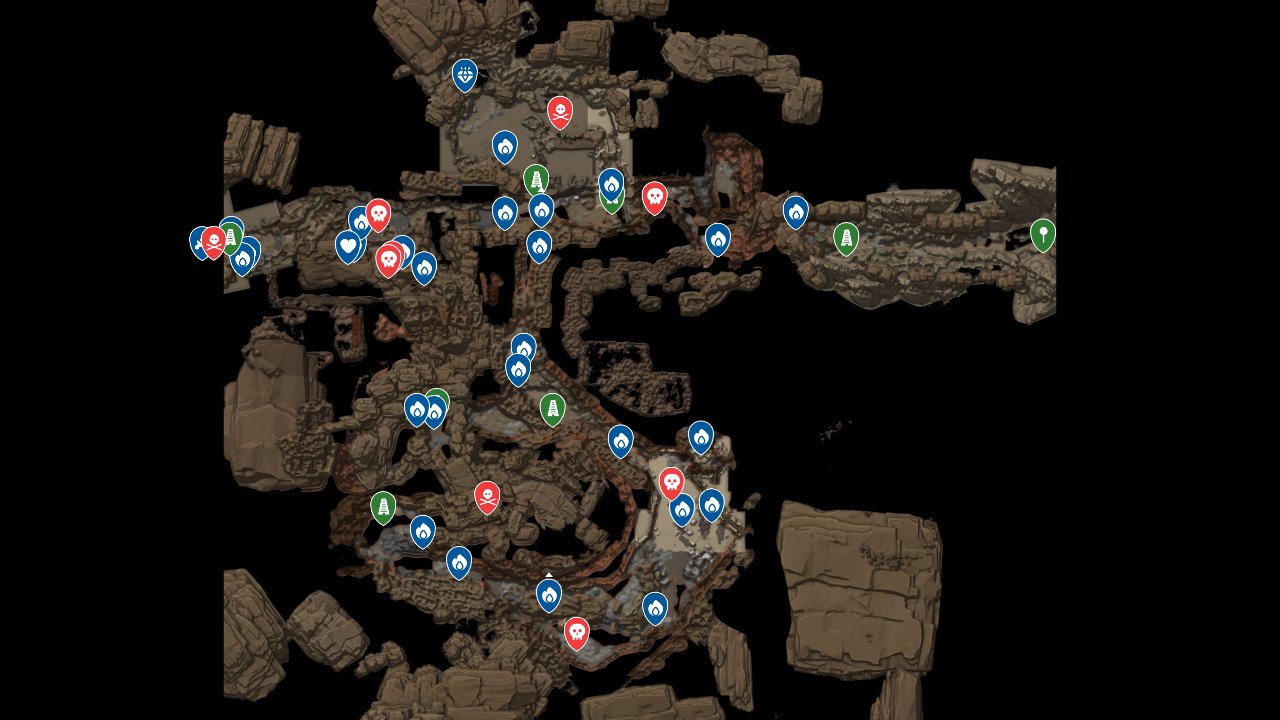
The Dinoblade Map on GameMappers.com gives players a fully interactive view of the game’s world, pinpointing every collectible, enemy location, and progression checkpoint across the complete map. Dinoblade drops players into a prehistoric world where missing key items or losing track of enemy spawns can derail even a focused run. This interactive map removes that guesswork entirely, giving you a reliable reference point at every stage of your playthrough.
Every marker on this map falls into one of three core categories: Collectibles, Enemies, and Progression. Whether you’re hunting down hard-to-find items scattered across the world or charting a route through enemy-heavy zones, the Dinoblade Map keeps your objectives organized and your momentum intact. It’s built for players who want to explore efficiently without sacrificing the satisfaction of discovery.
How to Use the Dinoblade Map
Collectibles and Secrets: The Collectibles category surfaces every hidden item spread across Dinoblade’s world. Use the filter toggle to isolate collectible markers so the map isn’t cluttered with unrelated data. As you locate each item in-game, mark it as found to keep your checklist current and avoid backtracking to areas you’ve already cleared.
Enemies and Combat: The Enemies category maps out creature locations across the full world, making it easier to anticipate threats before entering a zone. This is particularly valuable when you’re farming specific enemy types or trying to navigate through a densely populated area without burning through resources unnecessarily.
Progression Checkpoints: The Progression category tracks key milestones and story-critical locations that move your run forward. Use these markers to stay oriented within the game’s structure, especially when returning to the game after a break or planning which area to tackle next based on your current gear and level.
What the Dinoblade Map Can Do
Optimize Your Route Through the World
Dinoblade’s open world can feel sprawling when you’re trying to hit multiple objectives across a single session. The interactive map lets you plan a logical path through enemy zones and collectible clusters rather than zigzagging across the map inefficiently. Routing around high-threat enemy positions while picking up collectibles along the way saves significant time.
Track Collectibles Without Missing a Single One
Collectibles in Dinoblade are easy to miss on a first pass, especially when combat pulls your attention away from exploration. The map’s collectible markers give you exact positions, so you can move through the world methodically rather than relying on memory. Mark each item as collected in real time to maintain an accurate count toward full completion.
Manage Enemy Encounters Strategically
Knowing where enemies spawn before you enter a zone changes how you approach combat entirely. The Enemies category lets you identify clusters of tough opponents, plan engagement order, and locate reliable farming spots for grinding. If a particular encounter is punishing your build, you can use the map to find a safer approach angle or an alternate route around it.
Support Progression Without Getting Lost
Progression markers anchor your place in the game’s structure and highlight the locations that matter most for advancing the story. When you’re unsure whether you’ve completed a zone or missed a critical objective, these markers give you an immediate answer. They’re especially useful for players returning after time away who need to reorient quickly.
Plan Revisits and Completion Runs
Many players reach the endgame with collectibles and secondary objectives left unfinished. The interactive map makes completion runs straightforward by showing exactly which markers remain unchecked. Filter by category, scan the world for gaps, and knock out remaining content in a focused session rather than wandering aimlessly hoping to stumble across what’s left.
Dinoblade Map Overview
A quick reference for the key features of this interactive map.
| Category | Example | Why It Matters |
|---|---|---|
| Collectibles | Hidden items scattered across the world | Ensures nothing is missed during a completion run |
| Enemies | Creature spawn locations across all zones | Helps plan combat routes and identify farming spots |
| Progression | Story-critical checkpoints and objectives | Keeps your playthrough on track and prevents dead ends |
| Marker Tracking | Mark items and enemies as found | Maintains an accurate completion checklist in real time |
| Category Filters | Toggle between Collectibles, Enemies, Progression | Reduces visual clutter and focuses your session goals |
Frequently Asked Questions
What does this Dinoblade map cover?
The Dinoblade Map covers the full world with markers across three categories: Collectibles, Enemies, and Progression. Every marker is placed to reflect actual in-game locations, giving you a complete spatial reference for the entire game world in a single interactive view.
How does this map help with completion?
The map lets you mark individual items and locations as found, so you always know exactly what remains uncollected. Instead of revisiting every zone from scratch, you can filter by category and head directly to unmarked spots, making 100% completion a straightforward process rather than a frustrating one.
Are collectibles included on this map?
Yes, collectibles are one of the three primary categories on the Dinoblade Map. Every collectible location across the full world map is marked, and you can filter the map to show only collectible markers when you want to focus specifically on tracking those items down.
Does this map cover progression systems?
The Progression category on the map highlights key locations and checkpoints tied to advancing through Dinoblade’s world. These markers help you stay oriented within the game’s structure, identify where you are in the overall progression, and plan which objectives to pursue next based on where you currently stand.
Is this map complete?
The map is built to reflect the full scope of Dinoblade’s world across all three marker categories. The GameMappers.com community actively contributes to keeping map data accurate, so if you spot a missing marker or an incorrect location, you can flag it directly on the map to help maintain its accuracy for everyone.
Credit: Dinoblade Map by Wand