All Locations: Atomfall Guide
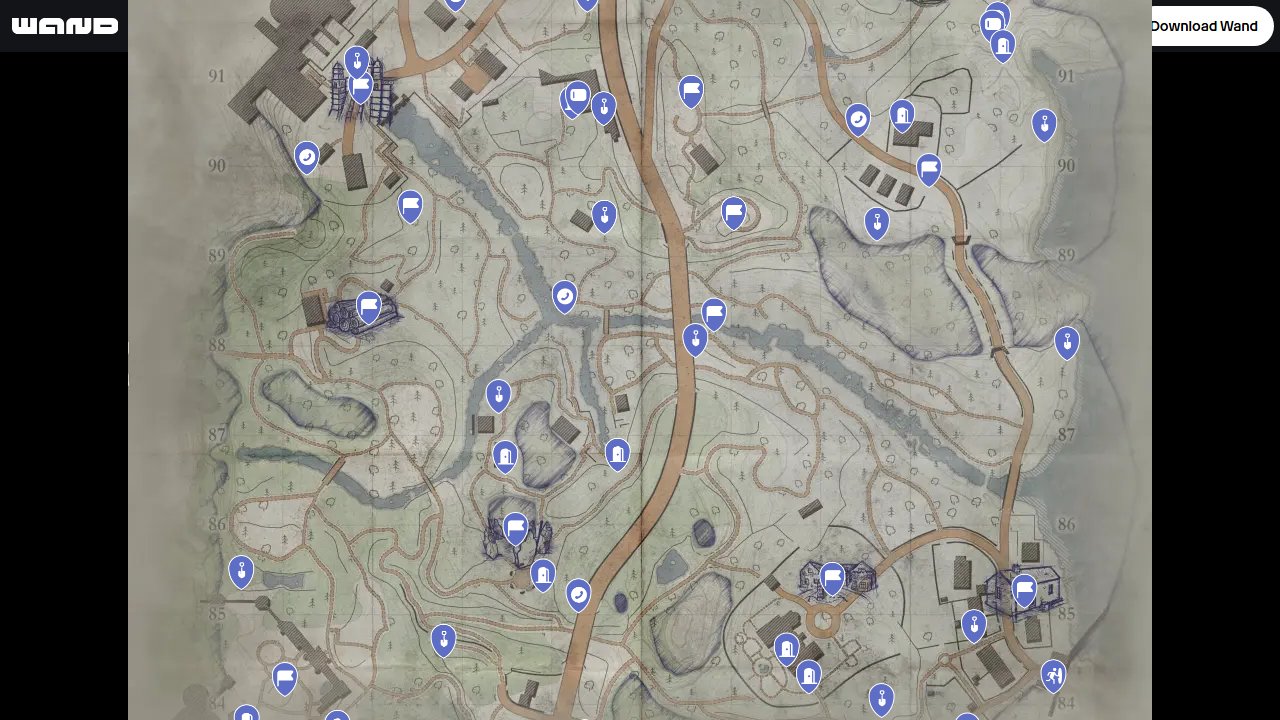
Locations in Atomfall represent the key points of interest scattered across the quarantine zone, ranging from hidden dig spots to crucial communication terminals. The Atomfall Interactive Map makes tracking these diverse location types straightforward by filtering out other markers and focusing solely on the spots that drive exploration and story progression.
Each location type serves different gameplay purposes, from uncovering buried secrets to accessing fast travel networks. Using the filtered map ensures you never miss critical spots that could contain valuable resources, story elements, or progression shortcuts.

What Locations Are Used For
Locations form the backbone of Atomfall’s exploration system, providing everything from story progression points to resource gathering opportunities. These markers unlock different aspects of the quarantine zone experience.
- Uncover hidden items and resources through dig spots and search areas
- Access communication networks via phone systems and dispatch tubes
- Navigate between major areas using transition points
- Discover story-relevant landmarks that expand the game’s lore
- Establish reference points for efficient zone traversal
Locations Types
The map categorizes locations into six distinct marker types, each serving specific gameplay functions within the quarantine zone’s interconnected systems.
Dig Spot
Dig spots mark buried caches and hidden stashes throughout the zone. These locations require specific tools to access but often contain valuable resources, documents, or equipment that other survivors have concealed. They’re essential for players focused on scavenging and resource accumulation.
Phone
Phone terminals provide communication access within the quarantine zone’s limited network. These locations often trigger story events, provide mission updates, or connect you with other survivors. Some phones require specific codes or items to activate, making them both puzzle elements and progression gates.
Locations
General location markers identify significant points of interest that don’t fit other specific categories. These encompass everything from abandoned facilities to survivor camps, each offering unique interactions, story beats, or gameplay opportunities within the contaminated landscape.
Pneumatic Dispatch Tube
Dispatch tubes represent the zone’s automated messaging system, remnants of pre-disaster infrastructure. These locations allow document transmission, quest progression, and sometimes provide access to restricted areas. They’re crucial for players following specific story threads or faction missions.
Transition
Transition points mark area boundaries and fast travel opportunities within the quarantine zone. These locations become increasingly important as you unlock new regions, providing efficient movement between distant areas and serving as strategic planning points for exploration routes.
Landmark
Landmarks identify major geographical or structural features that serve as navigation aids and story elements. These locations often house significant encounters, provide stunning vistas, or contain environmental storytelling that deepens your understanding of the disaster’s aftermath.
How to Use the Map Efficiently
Planning your location visits requires understanding the zone’s layout and the interconnections between different marker types.
- Prioritize transition points early to establish fast travel networks before tackling remote locations
- Group dig spots and phone terminals by geographical clusters to minimize backtracking
- Use landmarks as navigation anchors when planning routes through unfamiliar territory
- Check dispatch tubes regularly as they often unlock access to previously inaccessible areas
- Visit general locations during main story progression as they frequently tie into quest objectives
- Mark cleared locations to avoid revisiting empty dig spots or exhausted resource points
Locations Locations Table
Each location type offers distinct rewards and serves specific gameplay functions:
| Type | Primary Reward | Access Requirements |
|---|---|---|
| Dig Spot | Buried resources and items | Digging tools |
| Phone | Story progression and communication | Codes or quest triggers |
| Locations | Various interactions and encounters | Area access |
| Pneumatic Dispatch Tube | Document transmission and area access | Specific items or missions |
| Transition | Fast travel and area connections | Story progression |
| Landmark | Environmental storytelling and navigation | Exploration |
Tips for Locations Hunting
- Carry appropriate tools for dig spots before venturing into remote areas to avoid wasted trips
- Screenshot or note down phone numbers and codes found at other locations for future reference
- Explore landmarks during different times of day as lighting can reveal hidden details or access points
- Check dispatch tubes after completing major story beats as new messages often unlock additional content
- Use transition points as safe zones for inventory management and planning your next moves
- Approach general locations cautiously as they may contain hostile encounters or environmental hazards
FAQs
Can I revisit locations after clearing them?
Most locations remain accessible after initial visits, though dig spots typically don’t replenish their contents. Phones and dispatch tubes may receive new messages as the story progresses.
Do I need special equipment for all location types?
Dig spots require digging tools, while some phones and dispatch tubes need specific codes or items. Transition points and landmarks are generally accessible without special equipment.
Are locations tied to story progression?
Many locations unlock as you progress through the main story, particularly transition points and certain dispatch tubes. Some areas remain inaccessible until specific quest milestones are reached.
How do I know if a location has been fully explored?
The game typically provides visual or audio cues when locations are exhausted. Dig spots show disturbed earth, phones may display “no new messages,” and landmarks often provide completion notifications after full exploration.
Credit: Atomfall by Wand